How to Use a Promo Code: Where to Enter It at Checkout
On this page
- How to use a promo code, step by step
- Where do you enter a promo code?
- Where popular stores put the code box
- How to apply a code on common store platforms
- How to use a promo code in a store's app
- Can you use more than one promo code?
- What a promo code usually won't cover
- How to tell if your code worked
- What to do if the code won't apply
- Where to find this for a particular store
- Questions shoppers ask
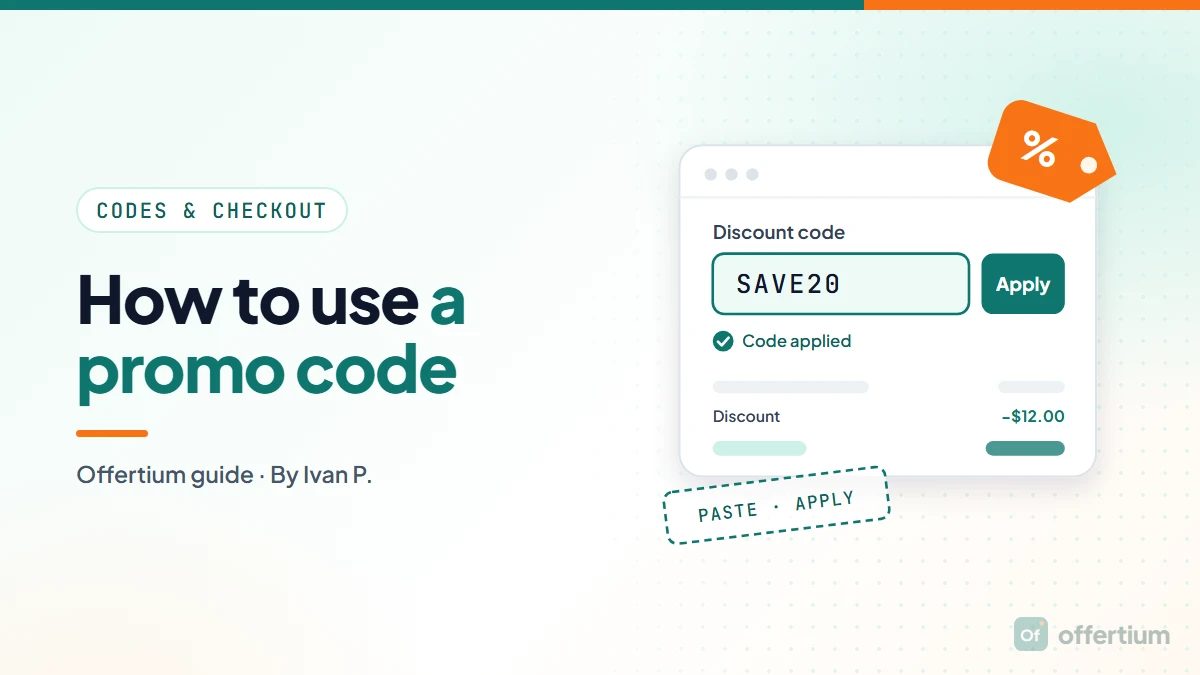
You add your items to the cart, go to checkout, paste the code into the box marked "Promo code", "Discount code" or "Coupon code", and press Apply. The discount should show as its own line before you pay. The only tricky part is finding the box, because every store puts it in a slightly different place.
Some examples: at Michaels and PetSmart it's at checkout, at VistaPrint it's on the cart page, and at Frontier Airlines it's in the flight search form.
How to use a promo code, step by step
- Copy the code exactly. Copy it rather than retyping it, and leave out any space before or after it.
- Fill your cart first. Add everything you want to buy. Many codes check the cart total or the items in it.
- Find the code box. It's usually on the cart page, in the order summary at checkout, or in the payment step.
- Paste the code and press Apply. Typing it in isn't enough. The store checks it only when you press Apply.
- Check the total before you pay. Look for a discount line with a minus amount and a lower total.
Where do you enter a promo code?
There are three usual places. Most stores use one of them, and a few let you add the code in two.
- The cart page. A box under your items or in the order summary, before you click Checkout. Many stores built on WooCommerce, Magento and Salesforce Commerce Cloud work this way.
- The order summary at checkout. A box next to your items on the checkout page itself. This is where Shopify stores put it.
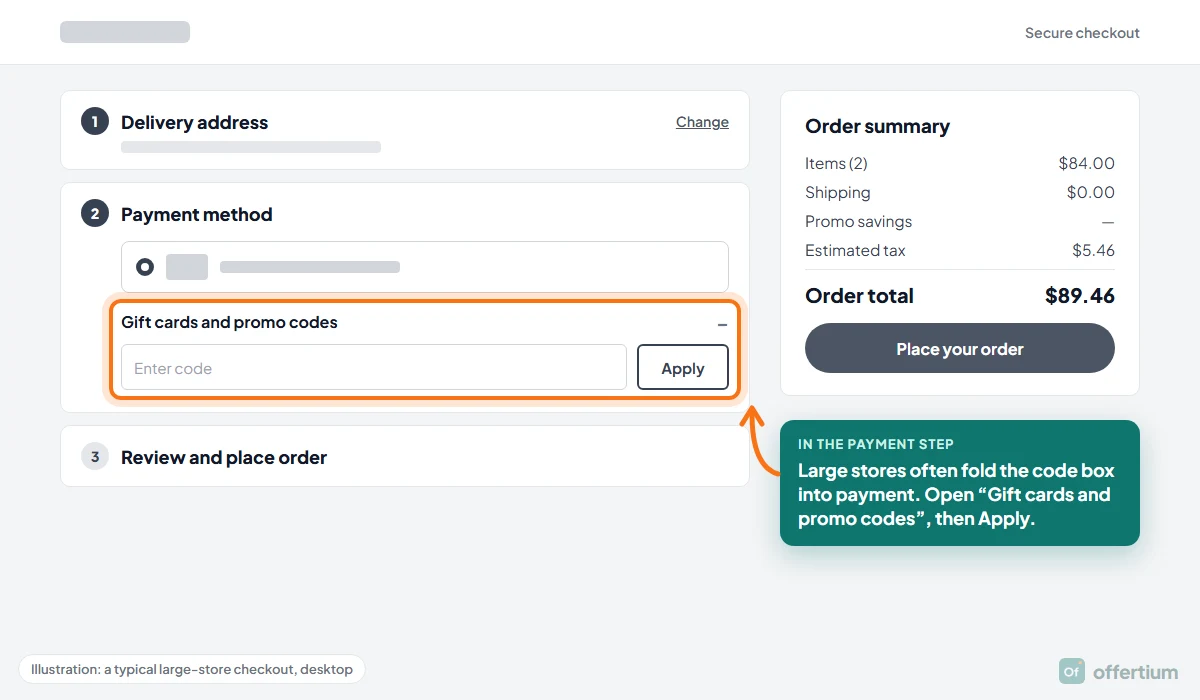
- The payment step. Large stores with step-by-step checkouts often fold codes in with gift cards, inside the payment section.
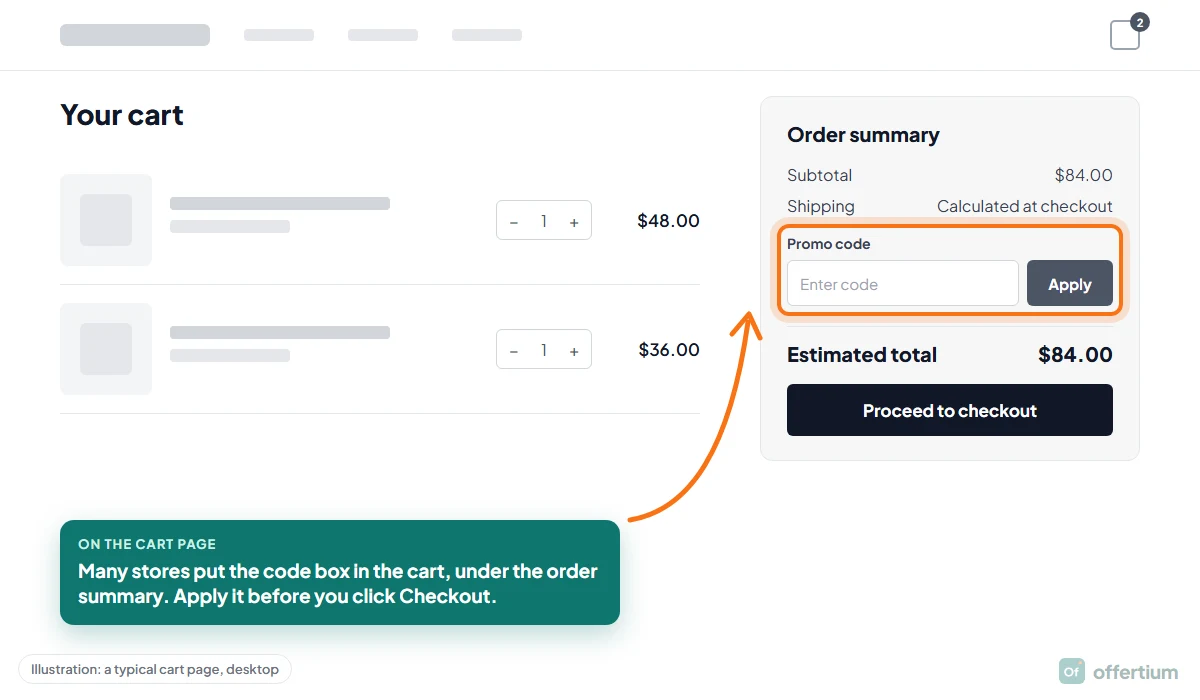
The label changes from store to store: "Promo code", "Discount code", "Coupon code", "Offer code", or "Voucher code" on UK stores. They all mean the same box. Some hide it behind a link such as "Have a promo code?", so look for small text near the totals.
Watch for a separate gift card box. Some checkouts have one box for gift cards and another for discount codes, and a promo code typed into the gift card box fails. Well.ca, a Canadian store, says exactly that: its codes go in the Coupon Code box and won't work in the Gift Card box.
Where popular stores put the code box
Here are the stores shoppers search for most, grouped by where the code goes. Shopping somewhere else? Its Offertium page has a "How to use" section with the same detail.
In the cart or bag, before checkout
- VistaPrint: paste the code on the Cart page and press Apply. Seen on VistaPrint's offers page, Oct 8, 2026.
- Lola Blankets: discount codes work in the cart or at checkout, but gift card codes only at checkout. Seen on Lola Blankets' discount codes page, Sep 29, 2026.
- Steve Madden: a Discount Code box sits in the cart, before checkout. Seen on Steve Madden's homepage, Oct 13, 2026.
- Sally Beauty: its codes are six digits, and they go in the field in your online cart. Seen on Sally Beauty's online orders help page, Oct 12, 2026.
- Boots, a UK store: you apply the offer code in the basket. Seen on Boots' homepage, Oct 13, 2026.
On the checkout page
- Michaels: online codes go in at checkout on michaels.com. Seen on Michaels' homepage, Oct 8, 2026.
- Fashion Nova: enter the discount code at checkout. Once the order is placed, it's too late to add one. Seen on Fashion Nova's promo terms page, Oct 8, 2026.
- CVS Photo: after you add items to the cart, the promo code goes in at checkout, on the website or in the app. Seen on CVS Photo's photo page, Oct 13, 2026.
- PetSmart: promo codes go in at checkout. Seen on PetSmart's promotional terms page, Oct 8, 2026.
- The Sak: at checkout, the code goes in the box labeled "Gift card or discount code", then you click Apply. Seen on The Sak's FAQ, Sep 29, 2026.
- Mack Weldon: on a phone, open "Show Order Summary" first, or you won't see the "Gift Card or Discount Code" field at checkout. Seen on Mack Weldon's FAQ, Oct 13, 2026.
In the payment step or the last step
- Shutterfly: choose a shipping method first. The promo code box comes after that, during checkout. Seen on Shutterfly's free shipping page, Oct 8, 2026.
- 6pm: the box labelled "Enter a gift card or promotional code" is in the Select A Payment Method section. Seen on 6pm's coupons page, Oct 22, 2026.
- Warby Parker: promo codes and gift cards go in with your payment details at checkout. Seen on Warby Parker's terms of use, Oct 19, 2026.
- Boden, a UK store: promotional and voucher codes go in the "Discount code or gift card" box on the payment page. Seen on Boden's promotional terms page, Oct 13, 2026.
In a booking or sign-up form
Airlines, car rentals and meal kits often ask for the code before you see a price. More of them are under Travel.
- Frontier Airlines: the Promo Code field is in the flight search form on the homepage. Seen on Frontier Airlines' homepage, Sep 29, 2026.
- Hertz: type the code before you search, using "Add a Discount Code" on the booking form. Seen on Hertz's rental car deals page, Oct 19, 2026.
- HelloFresh: an "Enter promo code" box appears on the plans page while you sign up. Seen on HelloFresh's plans page, Oct 12, 2026.
In the app, your account, or in person
Restaurants and delivery services lean on apps and rewards accounts. More are under Restaurants & Food Delivery.
- SpotHero: promo codes are entered at checkout in the SpotHero app, and its first-reservation offer of 10% off, up to $5, works only there. Seen on SpotHero's promo code page, Sep 29, 2026.
- Postmates: add the promo code to your account, or enter it at checkout before you place the order. It can't be added afterwards. Seen on Postmates' promo page, Sep 29, 2026.
- Wendy's: promo codes go in the Wendy's App, after you log in to a Wendy's Rewards account. Seen on Wendy's homepage, Oct 13, 2026.
- BJ's Wholesale Club: digital coupons aren't typed at all. You clip them to your membership account before checkout. Seen on BJ's Wholesale Club's same-day delivery page, Oct 19, 2026.
- Take 5 Oil Change: there's no code box. You show the text or email coupon on your phone to the technician, and screenshots aren't accepted. Seen on Take 5 Oil Change's coupons page, Oct 13, 2026.
How to apply a code on common store platforms
Most online stores run on one of a handful of checkout systems, so the code box sits in the same place on thousands of sites. Learn where it is on these few and you'll find it almost anywhere. Shopify is by far the most common among the stores on Offertium.
Shopify stores
On a standard Shopify checkout, the box is called "Discount code or gift card". On a computer it sits in the order summary on the right, under your items. On a phone the order summary starts folded at the top of the page: tap it to open it, and the box appears under your items.

True Classic, for example, says to open "Show Order Summary" at checkout and enter the code under Discount Code.
Many Shopify carts have no code box. The cart says something like "Discounts calculated at checkout", and you add the code on the next page.
Shop Pay: if you tap the Shop Pay button, you land on a Shop Pay screen. You can usually still add a code there, through a link near your items. If you can't find it, go back and use the regular checkout.
WooCommerce stores
WooCommerce runs on WordPress sites. The classic cart page has a "Coupon code" box with an "Apply coupon" button under the items. On the checkout page, the box is usually hidden behind a line that reads "Have a coupon? Click here to enter your code". Newer WooCommerce checkouts show a folded "Add a coupon" link in the order summary instead.
BigCommerce stores
BigCommerce's standard one-page checkout has a "Coupon/Gift Certificate" link in the order summary. Click it to open the box, paste the code and press Apply.
Magento and Adobe Commerce stores
Magento, now called Adobe Commerce, usually shows a folded "Apply Discount Code" section under the items in the cart, and often again in the payment step of checkout. Click the heading to open it. Stores often relabel it: Joe Browns, a UK store, puts its "Promotional code" box on the payment page.
Salesforce Commerce Cloud stores
Many large fashion and beauty brands use Salesforce Commerce Cloud. Layouts vary, but most put a "Promo code" box in the shopping bag. At LOFT and Ann Taylor, you enter the code in the Promo Code box in the Shopping Bag and click Apply.
Wix and Squarespace stores
Smaller stores built with Wix usually show an "Enter a promo code" link on the cart page, often in faint text just above the totals. Click it and the box opens. Squarespace stores take the code on the checkout page.
Amazon, Walmart, Target and other large stores
Big retailers build their own checkouts, and they tend to put codes in the payment step rather than the cart.
- Amazon: Amazon's help pages say to enter the code in the "Gift Cards and Promotional Codes" section on the payment method page or the Place Your Order page, then select Apply. Amazon also says you can't use Buy Now with a promotional claim code, so go through the cart. Many Amazon savings aren't codes at all: a coupon you clip on the product page comes off at checkout by itself.
- Walmart: Walmart's promo code terms say to enter the code at checkout in the field the offer describes. Look for it once you reach the payment part of checkout.
- Target: Target's help pages say online promo codes are entered during checkout. Target Circle deals work differently: you add them to your account, and they apply on their own.
How to use a promo code in a store's app
In most shopping apps, the code box sits where it does on the website. Two things differ.
- Some codes and offers work only in the app. Stores use app-only offers to get you to download it. A code like that fails on the website.
- Some apps hold offers in your account. Instead of typing a code, you add the offer to your account or wallet in the app, and it applies at checkout. Check the offers or rewards tab before you pay.
A few well-known stores with app offers:
- Walgreens: an extra 10% off sitewide when you join myWalgreens and download the app. Seen on Walgreens' homepage, Sep 29, 2026.
- Fashion Nova: runs app-exclusive promotions, so check the app before you order on the website. Seen on Fashion Nova's FAQ, Oct 8, 2026.
- Taco Bell: exclusive rewards and the sign-up reward can be redeemed only in the Taco Bell app. Seen on Taco Bell's homepage, Sep 29, 2026.
- McDonald's: a free medium fries with a $1 or more purchase, once a week, until the end of the year. Seen on McDonald's homepage, Oct 19, 2026.
- Holland & Barrett, a UK store: 20% off your first app order. Seen on Holland & Barrett's homepage, Oct 13, 2026.
It works the other way too: a website code may not work in the app, so if a code fails in one place, try the other.
Can you use more than one promo code?
Usually not. Most stores allow one promo code per order, and the box often replaces the first code with the second. Murad and Nine West both say one code per order. Try each code on its own and keep the one that takes off more.
What does often combine with a code:
- Gift cards and store credit. They're a way to pay, not a discount, so most stores accept them alongside a code.
- Free shipping over a set amount. If your order still reaches the threshold after the discount, you usually keep it.
- Loyalty points and rewards, at some stores. The terms on the store's rewards page say whether they mix with codes.
What a promo code usually won't cover
Even a code that works may leave part of the order at full price. Common exclusions are items already on sale, gift cards, certain brands, subscriptions, and shipping or taxes. Amazon's terms, for example, say its codes don't apply to gift cards, sales tax, Prime fees, gift wrap or extra shipping costs unless the offer says otherwise. "See details" on an Offertium offer lists what's left out.
Some savings need no code at all. During big sales such as Black Friday and Cyber Monday, read the offer before you hunt for a box. Celebrity Cruises, for example, says its Fall Sale offers need no promo code and apply automatically at checkout.
How to tell if your code worked
Don't rely on a "Code applied" message alone. Before you pay, check three things:
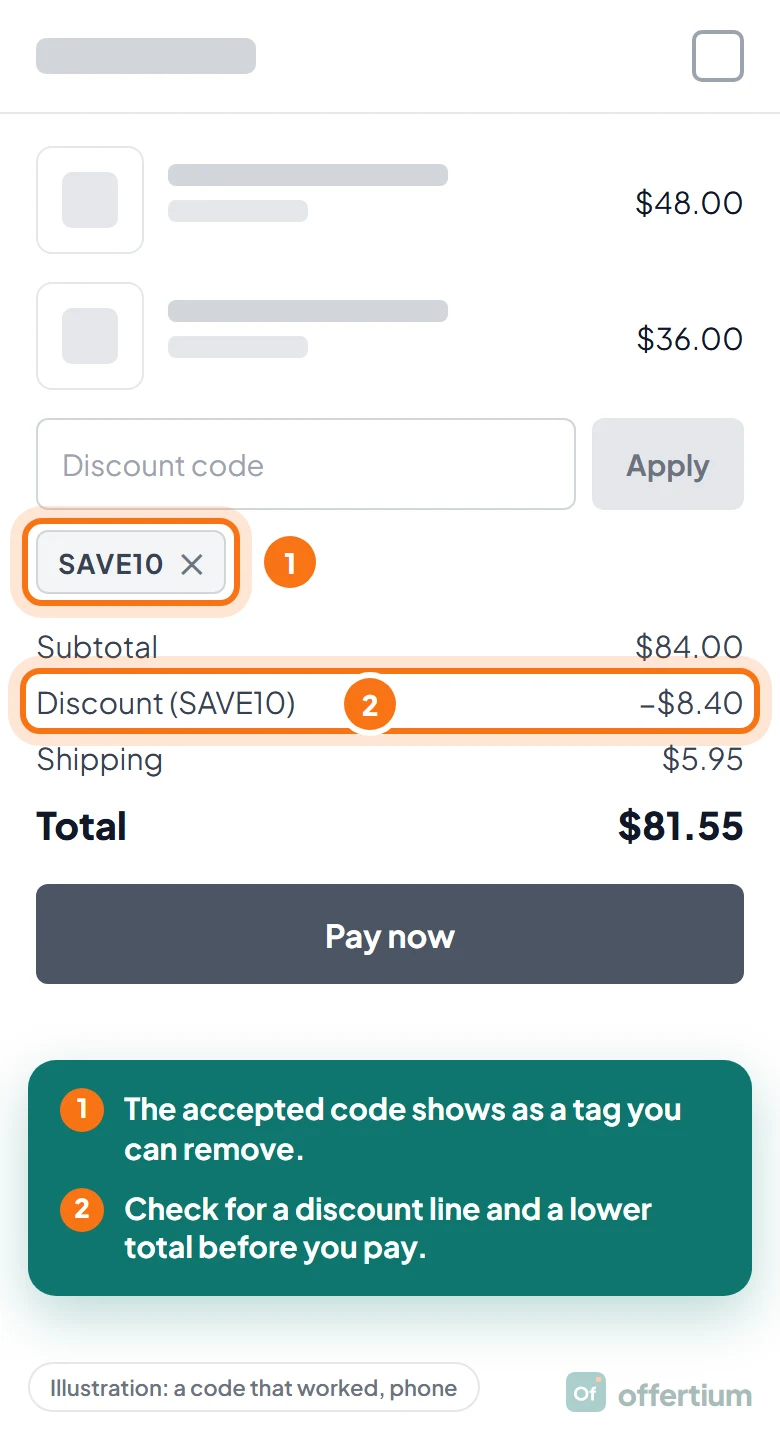
- The code appears as a tag or line under the box, often with an × to remove it.
- There's a discount line with a minus amount, such as "Discount −$8.40".
- The total is lower than before you applied it.
Forgot to add it? Most stores can't add a code once the order is placed. Fashion Nova and Youtooz both say so. Egyptian Linens is an exception: its customer service can apply a forgotten code after the order. Elsewhere, contact support quickly. Some stores refund the difference, but it's their choice.
What to do if the code won't apply
Most failures come down to a rule in the offer, not a broken code. Run through these quick checks:
- Paste the code again, with no spaces around it.
- Make sure you used the code box, not the gift card box.
- Match the capital letters. Shake Shack says its codes work only in all caps, and Lee and Mizuno say theirs are case sensitive.
- Check the minimum order and the end date in the offer's terms.
- Remove any code that's already applied, then try again.
- Check you're on the right country's site, or the app if the code is app-only.
If none of those fixes it, our guide to why promo codes don't work walks through the 12 usual reasons and what to try next.
Where to find this for a particular store
Every Offertium store page has a "How to use" section that tells you where the code box sits, in the store's own words, with a date. Find your store to see it, or start from a category such as Clothing & Fashion or Beauty. Student codes usually need a check first: our guide to student discounts explains it. See how we check codes for what "Verified" means on an offer.
Questions shoppers ask
Is a promo code the same as a coupon code?
Yes. Stores use promo code, coupon code, discount code, offer code and voucher code for the same thing: a word or string you type at checkout to get money off. They all go in the same box.
Why can't I see a promo code box?
It may be on the next page, folded behind a link such as "Have a promo code?", or inside a collapsed order summary on your phone. Some stores have no box at all, because their offers apply automatically or are added to your account instead.
Can I add a promo code after I've placed my order?
Usually not. Most stores apply codes only before you pay, and Fashion Nova and Postmates both say a code can't be added once the order is placed. If you've just ordered, contact the store quickly: some will refund the difference, but they don't have to.
Do I need an account to use a promo code?
Not usually. Most stores accept codes at guest checkout. Codes tied to a person, such as welcome, student or loyalty codes, may ask you to sign in first. Wendy's, for example, takes promo codes only in its app, after you log in to a Wendy's Rewards account.